
It is an exceptionally relatable feeling. You’re driving on the highway, the radio is on, and a little yellow engine symbol lights up on your dashboard. In that moment, the stomach drop is inevitable. The anxiety the check engine light brings is unbearable, and the thought of a mechanic’s bill is dreadful. The root problem is that cars do not have the ability to talk to us. When the engine has a problem, a warning light is simply flashed. Without the correct tools, the driver does not know if the problem is something as small as the gas cap being loose or something as serious as the transmission being about to fail.
It is possible to interpret what the vehicle is trying to say. With a low-cost OBD2 scanner, you’re able to access the vehicle’s computer. This tool is very empowering to the driver of the car. It saves time, avoids the cost of unnecessary repairs, and brings peace of mind to the driver. We will teach you how to interpret trouble codes, frame data, and fuel trim like a true professional.
A Primer on OBD2 and Why You Should Care
Since 1996, OBDs and on-board diagnostics (2) have become standard on every gasoline vehicle sold in the United States. The OBD is the brain of your car. The monitoring of sensors is continuous for a car, truck, or SUV, from its engine to emissions. Problems are detected by a sensor in the OBD2, which also saves the error to the system’s memory and illuminates the check engine light. Because it eliminates the guesswork required to maintain a vehicle, this system is extremely important.
Instead of paying a repair shop to plug in a scanner and charging you for their expensive diagnostic fee, you can buy a basic code reader and do it yourself for less than an oil change. When you understand your OBD2 system, you regain control of your vehicle’s well-being. It validates mechanics, upholds the integrity of honest shops, and allows you to repair minor problems anywhere, even your driveway.
Reading Diagnostic Trouble Codes (DTCs)
When your car comes across an error, it creates a diagnostic trouble code, also known as a DTC. To solve any issues regarding modern-day cars, you must learn how to read these codes.
Here is a simple, step-by-step process to read your engine codes:
- Find the OBD2 Port: The OBD2 port is located at the bottom of the dashboard on the driver’s side and can be found above the pedals or slightly closer to the door.
- Insert the Scanner: The scanner must be placed in the port as you would a computer cable in a computer.
- Ignition on: The dashboard lights should be on; however, the engine must be off.
- Scan for Codes: Then, you should follow the instructions provided by your scanner to read the system.
Your scanner produces a five-character code like P0300. We’ll show you the decoding rules. The first letter indicates the physical system the code refers to. P is Powertrain (engine, transmission); C is Chassis (brakes, etc.); B is Body; and U is Network or User system. Following the first letter is a number. P0300 indicates a misfire in the engine system. Once the code is known, input the code, system, and vehicle make and model to see the common misfire solutions.
Understanding Freeze Frame Data
Knowing the system is useful, but it is only part of the task. Knowing the code in the whole system is essential. Freeze-frame data provides details to fill in this part. It is best to think of freeze-frame data as a digital picture that the car took at the time the system stopped working. When the check engine light is working, frame data indicates the system state. Often, freeze-frame data indicates the speed of the car, the system state, the engine temperature, and the system load.
This snapshot helps you replicate the problem without risk or damage. If the engine check light only turns on when the engine is cold and idling in park, that information will be captured in the freeze-frame data. Understanding the specific operating requirements to capture the data helps you to not waste time and money diagnosing and replacing parts that have nothing to do with the real problem, such as severe highway acceleration. It leads you to the problem.
Mastering Fuel Trim Analysis
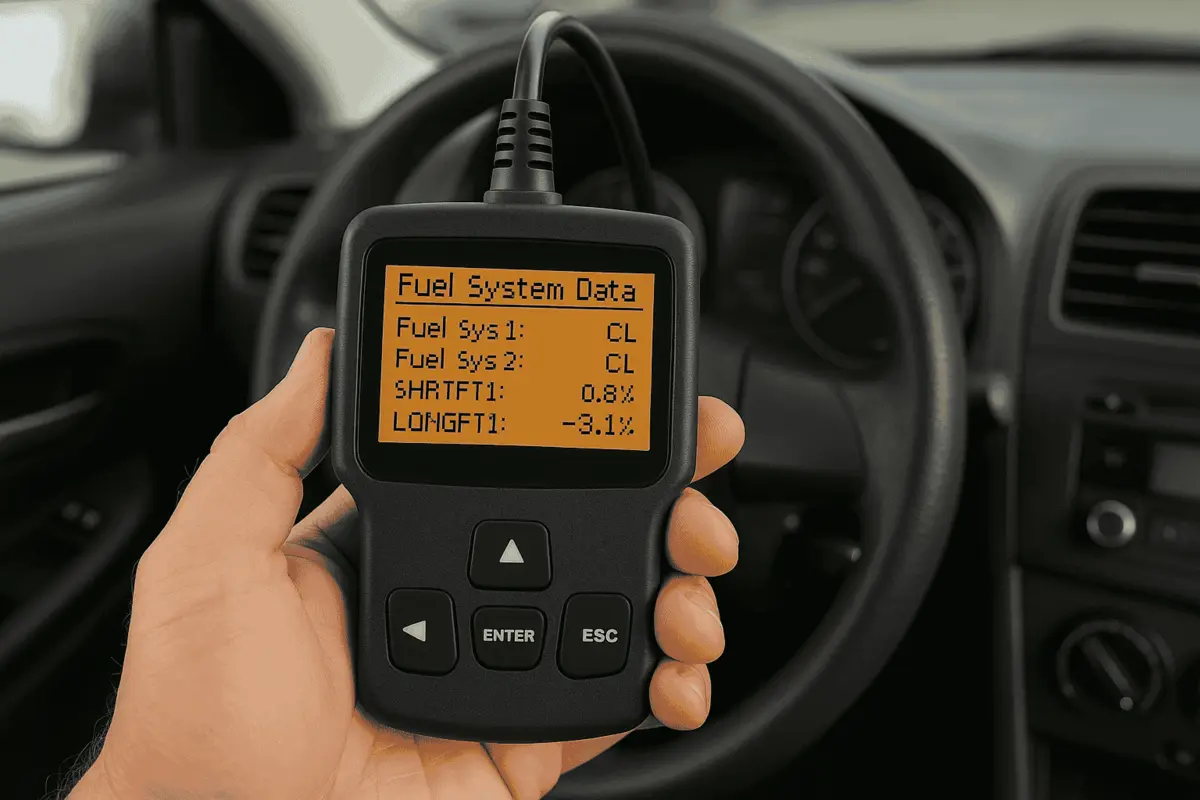
Fuel trim may sound complicated and is likely a foreign concept to som; yet once you’re exposed to itt, it can be fairly easy to understand. Every engine has a specific operating range, and within that range, the engine requires a specific ratio between fuel and air. If too much air is introduced into the engine, the engine runs «lean.» If too much fuel is introduced into the engine, the engine runs «rich.» The computer in your car is constantly monitoring the range of that mixture via O₂ sensors located in the exhaust, and it will adjust the fuel injectors as necessary. It essentially «trims» the fuel to the necessary level to keep the engine operating normally.
You will see two different types of fuel trim on your advanced scanner:
- Short-Term Fuel Trim (STFT): This shows how the fuel trim is set by the computer in real-time, second by second. It can change visibly when the accelerator pedal is pressed
- Long-Term Fuel Trim (LTFT): This shows how the fuel trim is set by the computer after a longer period of time due to a change in the fuel mixture. If the STFT shows a consistently «add fuel» command, the computer will allow the fuel mixture to be at that level.
Fuel trims ideally should hold 0%. Is your scanner telling you a +15% trim? Your system is adding a lot of fuel to counter a large vacuum issue, usually a busted vacuum line. Is the fuel trim at -15%? Fuel is being pulled away, and a dripping fuel injector is likely. Understanding fuel trim beds and mechanical vacuum issues is very helpful.
From Fuel Trim Basics to Advanced OBD2 Tricks
Allowing you to understand the basics of fuel trim, the scanner becomes a powerful tool. The tips below will help you use an OBD2 scanner with fuel trim settings like a professional. First and foremost, don’t clear the code until the issue is resolved. Many people have the misconception that fixing the code clears the issue. The dash is only free from a warning until a self-diagnostic is run on the system. The code is still present, but clearing it also clears the data capture for that instance.
Second, check the voltage on your battery before replacing any parts. Modern vehicles depend on accurate and stable battery voltages. A weak battery can also become a source of fault codes; before you replace an expensive component, get your battery tested.
Finally, keep in mind that a code points to the system, not to the exact part. For instance, having a code for an oxygen sensor does not mean that the oxygen sensor is faulty. This may indicate that an exhaust leak is causing the sensor to read incorrectly. Do not consider the code to be a direct part of the purchasing guide. Rather, it should be the starting point for the investigation.
Conclusion
Sudden car problems are certainly annoying, but with this tool, you aren’t in the dark anymore. An OBD2 scanner is an excellent first step in understanding the complex inner workings of your car.
An OBD2 scanner helps you learn more about your vehicle maintenance by teaching you to understand the basic trouble codes, where to look for snapshots, and how to keep watch on your fuel. It gives you the confidence to go to a repair shop, and you can even carry out simple diagnostic repairs in your driveway! Just plug it in, and listen to the mechanics of your car!
FAQs
1. Can any OBD2 scanner read all the codes on my car?
Basic and cheaper scanners can read only the generic powertrain codes for the engine and the emissions systems. If you also want to have access to the proprietary codes of the anti-lock brakes (ABS), airbags (SRS), or transmission, you will need to get a more advanced scanner, and most likely one that is brand-specific.
2. Will plugging in an OBD2 scanner damage my car’s computer system?
Definitely not. An OBD2 scanner simply acts as a receiver. It simply reads the information that your computer is already sending. It does not change the system, nor does it damage your internal computer. It is a safe passive diagnostic tool.
3. Why did my check engine light turn off completely by itself?
When the computer detects a certain problem, if that specific problem does not recur after a predetermined number of driving cycles, the car will turn the light off. It considers this fault to be an anomaly. Of course, the code is still in the system, should you ever want to verify it.
4. Will the OBD2 provide precise guidance on what I should purchase?
No. What it does is let you know which system is not functioning in its normal pre-programmed way. The cause of poor performance can come from a damaged sensor, a broken wire, or a mechanical fault. A little bit of hands-on troubleshooting is your responsibility.

Written by Michael Reyes, part of the FallasDeAutos editorial team. Michael focuses on helping car owners understand and fix common vehicle problems with simple, practical guidance. His content covers diagnostics, maintenance, and troubleshooting, making complex automotive issues easier to understand. He aims to provide clear, reliable information that helps readers make informed decisions while encouraging consultation with qualified mechanics when needed.